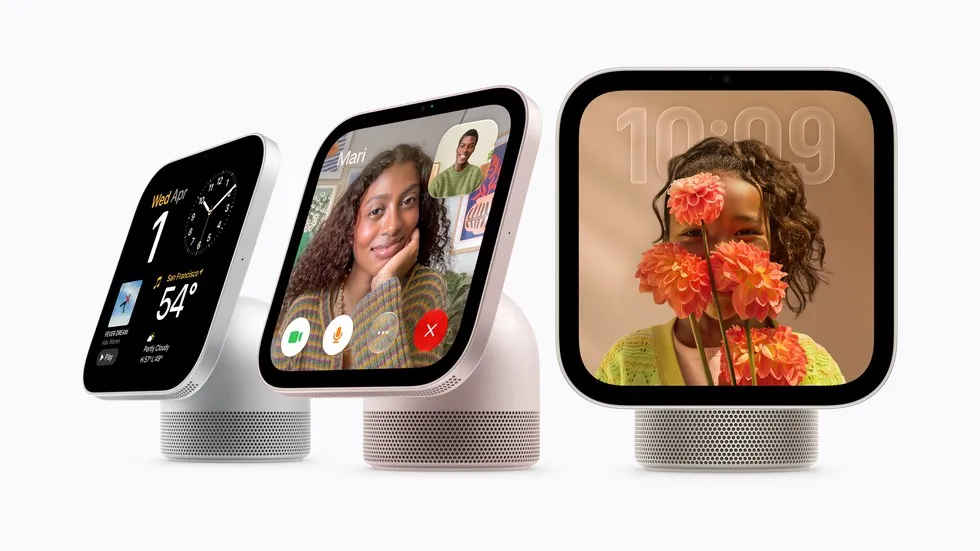
Apple HomeView went on sale on November 13, 2026, with U.S. prices starting at $299, Apple said. The seven-inch smart display combines Siri AI, FaceTime and controls for connected home devices.
The launch includes Australia, Canada, India, New Zealand, Singapore, the UK and the U.S. Apple says it is not selling HomeView in the European Union because Siri AI remains unavailable on iOS there.
What Apple HomeView does at home
Apple describes HomeView as a shared household device with personal profiles for up to six people. Its face recognition brings up each person’s content, including messages, reminders and calendar entries. The tabletop version sits on a speaker base; a separate version mounts on a wall.
Apple’s guide shows uses beyond turning lights on and off. For example, a recipe opened in Safari can switch to a clear, step-by-step view. A song, call, video or recipe started on an iPhone can continue on HomeView through Handoff, Apple’s feature for moving an activity between devices.
Apple also says the display can serve as a digital photo frame using a user’s photos or shared albums. Its Center Stage camera keeps people in the frame on calls as people move or join the picture.
Apple’s official promotional video below shows the intended household experience. It is a product demonstration from the manufacturer, not a test by an outside reviewer.
Apple HomeView models and setup costs
Apple’s specifications show that both models need wired power. The tabletop package includes a USB-C cable and a 30-watt adapter. However, the wall model requires a mount that fits, cable and power supply bought separately, so its $299 device price is not the full setup cost.
| Feature | Tabletop | Wall mounted |
|---|---|---|
| Display | 7-inch | 7-inch |
| Power | Wired; cable and 30W adapter included | Wired; mount, cable and adapter sold separately |
| Speaker hardware | Two full-range drivers, woofer, passive radiators | Two full-range drivers |
| Colors | Silver, starlight, rose pink, space gray | Silver, space gray |
Source: Apple specifications
Data as of: 2026-11-14
However, the wall model requires separately purchased mounting and power equipment.
Apple also lists an A18 chip, a 12-megapixel camera and a 1088-by-1088-pixel screen. Both versions have two full-range speakers, while the tabletop base adds a woofer and passive radiators. That hardware difference matters when comparing the two as music players, though their screens are the same size.
A compatible phone or tablet still matters
Apple lists an iPhone with iOS 27.2 or later, or an iPad with iPadOS 27.2 or later, plus Wi-Fi internet access for setup. HomeView therefore needs a phone or tablet to get started; buying the display alone is not enough.
Apple’s first announcement draws a line between general questions and requests about a user’s own data. Users without an Apple Intelligence-capable phone or tablet can still ask general questions and chat with Siri. For Siri to find details from someone’s messages or calendar, Apple requires a paired device with Apple Intelligence.
This explains the term “personal context”: it means data tied to one user, rather than an answer anyone can ask for. Apple gives examples such as finding details in Calendar or Messages and acting across apps. A supported language and current software are also required for these requests.
Privacy and AI limits
Apple says private content appears when HomeView recognizes the user’s face and their paired iPhone or iPad is nearby and was unlocked a short time ago. The launch notes add an exception when that device has left Wi-Fi: access may continue if rules about location, cell service and unlock timing are met. So a face match is only part of the access rule.
Apple’s AI usage terms add another limit. After a user hits a limit, a feature may stop working for a time or do less. Other device features remain usable while the limit resets. Limits can differ by feature and change over time.
A support page on usage limits says users will be able to pay for more use of some AI features that run on servers. It does not provide a price or a fixed number of HomeView requests. So buying the device does not mean every future AI feature will have no usage cap.
Early reviews identify app restrictions
In his hands-on review, TechRadar’s Jacob Krol said HomeView has no App Store and works with a small set of media apps from other firms. He tested Spotify, Nugs, Apple Music Classical and SiriusXM. He praised the tabletop model’s sound, but found that some complex Siri tasks took 10 to 15 seconds.
Tom’s Guide reviewer Mike Prospero found another limit: some widgets appeared on HomeView but could not open the full app there. For example, he listed Disney+ and YouTube. He said starting video on an iPhone and sending it to the display took an extra step.
These tests add a point to Apple’s feature list: displaying an app’s widget does not mean its full app runs on HomeView. The reviews describe the launch software, so they do not show what future updates will add.
What Apple has scheduled next
Apple says Canadian French support will arrive in a free software update. A Schneider Power Mount using Power over Ethernet, which supplies power through a network cable, is due in early 2027 for $129.95 in the U.S. Apple has not given an EU launch date in its availability announcement.
Sources: Apple launch notice, Apple product guide, Apple specifications, Apple introduction, Apple usage terms, Apple usage limits, Apple video, TechRadar, Tom’s Guide